Using the Experiment Board
The board is your central hub for moving experiments through their real lifecycle. It is not a generic project-management board. The three columns mirror how an experiment actually progresses, from idea to logged learning.
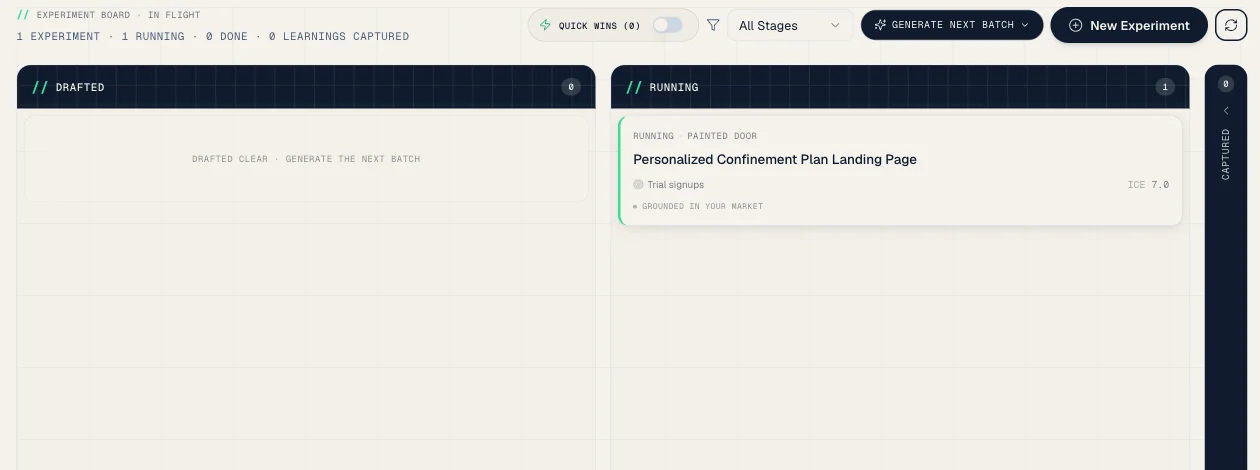
The three stages
| Column | What it means | When a card lands here |
|---|---|---|
| Drafted | The experiment exists but isn't committed yet | When you create one, or the AI chain generates a batch |
| Running | The test method is live and sample size is accumulating | When you commit and start the experiment |
| Captured | The test is done and the learning is logged in your library | When you record the result and capture the learning |
Why "Captured" instead of "Done": the learning, not the closed ticket, is the output. An experiment is not finished until its learning is in your library, where it can sharpen the next hypothesis.
What each card shows
Each card stays scannable, so you can read the board fast. It leads with the title and shows:
- Status and test method - e.g. Running · Painted door
- Target metric - the signal this experiment moves
- ICE cue - the one priority number (mint when strong, coral when weak)
- Grounding marker - "Grounded in your market", or "Cites N of your learnings" when the experiment is anchored to your own past results
- A flag - a risk icon for high-risk tests, or a checkmark once a learning is captured
The full ROTI and AAA scores, the decision contract, and per-dimension reasoning are one click away in the detail view (and the Database table shows every score in columns).
Card actions
Click any card to open the detail dialog. It opens on three tabs:
- Overview - the AI's read of the experiment: the hypothesis, a collapsible "how I read this" trace, and "how I'd run it" steps, with "Let the agent run this" and "Set it up myself"
- Details - the ICE / ROTI / AAA scorecard, the decision contract (metric, ship-if threshold, sample size, duration), per-dimension reasoning, and the Start Building This Experiment (Execution Wizard) action
- Results - baseline and progress tracking, result recording, and learning capture
Market-grounded experiments also show their Evidence Panel here.
Best practices
- Generate a batch with AI to keep Drafted healthy, then commit the strongest to Running
- Move experiments to Running quickly. Planning without running produces no learnings
- Do not leave experiments Running past their sample size. Capture the learning and move on
- Re-check ICE and ROTI as new learnings land. Priorities shift as you learn
